Most web applications fetch their data over the network on every interaction. That’s often justified: the data is dynamic, reacts to user actions, or refreshes at regular intervals. But it isn’t always the case, and that’s where it hurts: how many times do we retrieve, at a hefty latency cost, a piece of data that hasn’t changed since the last request? Caching is the time-honored answer to this waste, and it starts with something you already have at hand: the HTTP protocol.
This first installment in a series devoted to caching lays the foundations. Before diving into the more advanced mechanisms (where the performance gain actually comes from and then invalidating and evicting cached data), we need to understand how, with a single line of HTTP header, you can already transform an application’s performance.
The problem: over-fetching
For many applications, every render triggers a fresh network round-trip. As long as the data changes at every moment, that freshness makes sense. But take a visualization dashboard whose numbers are only refreshed once a day, when the data lake is updated: reloading that same data on every visit, on every automatic refresh, for every user, brings absolutely nothing. That’s over-fetching: we retrieve more, and more often, than necessary.
The consequences aren’t trivial. Over-fetching mechanically degrades perceived performance (every request costs its network latency), overloads the infrastructure as a whole, from the application server down to the database, and ends up weighing on the user experience. Not to mention the least visible but very real aspect: all that pointless traffic consumes energy. Serving the same immutable response a hundred times is hardly eco-friendly.
Caching, a universal solution
Caching is a persistence technique that lets you access, very quickly, the result of an operation already performed, or a resource already fetched during a previous action. Instead of redoing the work (querying the server, hitting the database, re-transferring the payload over the network), you reuse a copy kept within reach.
The idea is universal because it applies to nearly every layer of a system. But the simplest way to benefit from it, and the one that requires no additional infrastructure, goes straight through HTTP via the Cache-Control header. This header, set by the server on its responses, defines the caching strategy: who is allowed to keep the resource, and for how long.
Caching with HTTP: the Cache-Control header
Cache-Control distinguishes between two broad families of caches, depending on whether the stored copy is reserved for a single user or shared across many. The choice between the two isn’t a technical detail: it determines what you’re allowed to store there and where the load shifts.
The private cache (Cache-Control: private)
A private cache is specific to each user. It’s natively managed by the browser, which transparently intercepts all the relevant requests and responses: you can keep API responses there, but also images, scripts, or documents.
Cache-Control: private, max-age=3600Its main advantage stems from this isolation: each user has their own version of the cache, on their own browser. The data can therefore be personalized, authenticated, and potentially remain available offline.
Its limitation is the flip side of the same coin. The infrastructure load stays intact as soon as many unique users issue their first request: each one has to build their cache from scratch, and it’s always the origin server that responds. A private cache pools nothing across users.
One final point of caution: never store truly sensitive data there. Browser caches are a target for attacks, and confidential data left on the disk of a shared machine can leak.
The shared cache (Cache-Control: public)
A shared cache, on the other hand, is reusable by many users at once. Beyond the browser, it can be managed by a CDN (Content Delivery Network) or by other intermediate servers such as a reverse proxy, NGINX or HAProxy, for example.
Cache-Control: public, max-age=3600The benefit is considerable: one user’s first request warms the cache for all the ones that follow. Performance improves in a distributed way, whatever the user load, and the origin server is offloaded accordingly.
The drawback follows from its public nature: the data stored must not be sensitive, and it becomes hard to keep a version specific to each user. Be especially careful with the public directive: any response, including an authenticated response carrying an Authorization header, can end up distributed as-is to multiple users. Private data served from a shared cache is a guaranteed leak.
Controlling lifetime: max-age and s-maxage
Defining who can cache isn’t enough; you also have to specify how long the copy stays valid. Two directives handle this, and their difference is subtle but decisive:
max-ageapplies to all caches, including the browser’s. Its value is expressed in seconds (max-age=3600= one hour).s-maxageapplies only to shared caches: CDNs and proxies. The “s” stands for shared. It’s ignored by the browser, and takes precedence overmax-agefor shared caches.
By combining the cache type (private / public) and the lifetime directive (max-age / s-maxage), you get three reference strategies, illustrated below.
1. Private cache, managed solely by the browser
Cache-Control: private, max-age=3600Each browser intercepts the GET https://some-api.com/resources request and reuses the data stored locally on disk for one hour. The API server is only called on each user’s first request. Nothing is pooled across them.

2. Public cache, managed solely by the CDN
Cache-Control: public, s-maxage=3600Here, choosing s-maxage over max-age is deliberate: it forces caching only at the CDN and other proxy level, without involving the browser. The CDN checks the requested resources and serves its shared copy as long as it’s valid, only querying the API server when needed. One user’s first request benefits all the others.

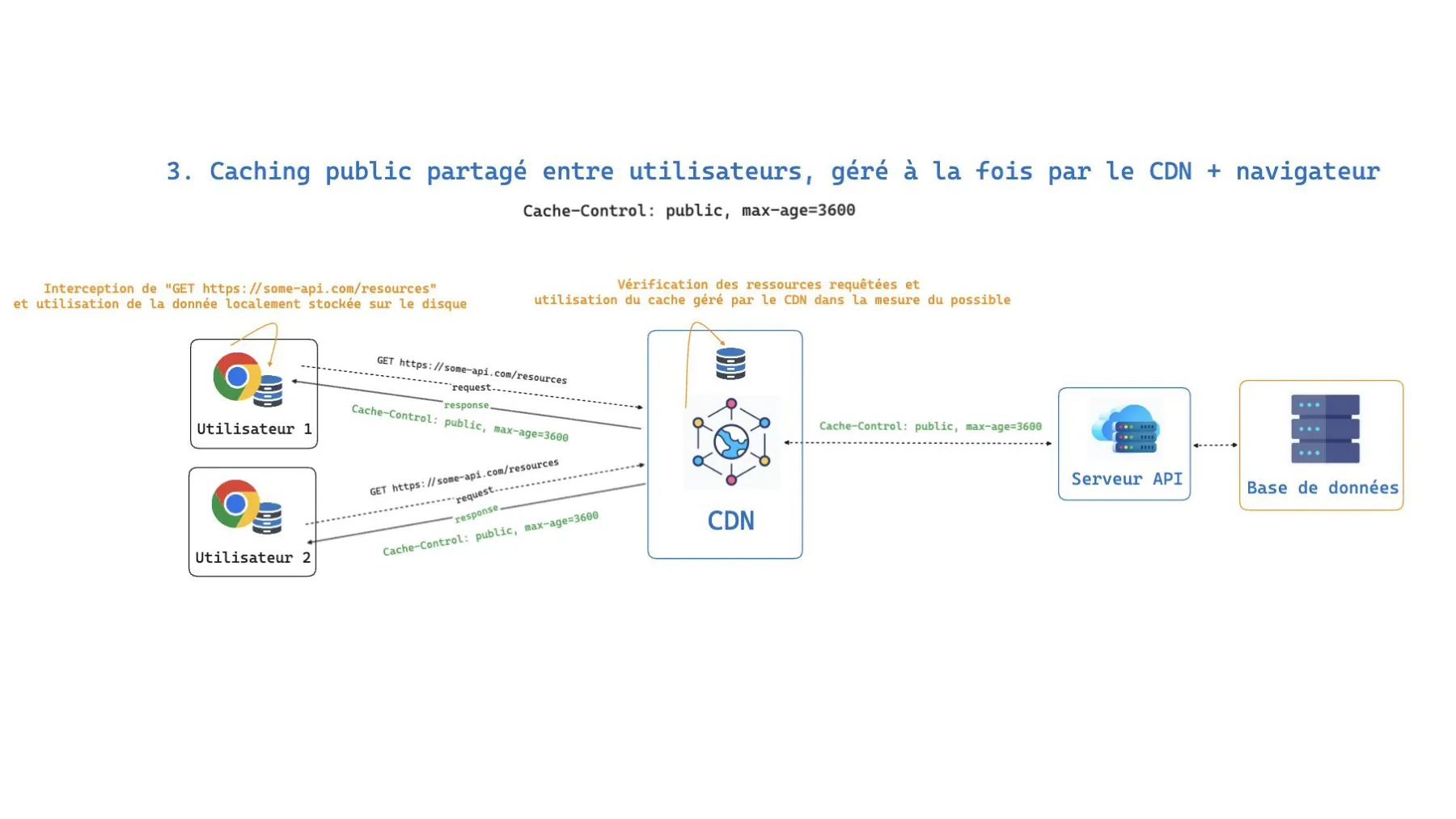
3. Public cache, managed by both the CDN and the browser
Cache-Control: public, max-age=3600With public, max-age, caching operates at both levels simultaneously: the browser keeps its local copy and the CDN maintains a shared copy. It’s the most aggressive strategy in terms of performance (the request can be resolved without even leaving the user’s machine) but also the one that demands the most caution about the data being exposed.
Conclusion
With a single line of HTTP header, you already change the game: by choosing the right cache type (private or public) and the right lifetime directive (max-age or s-maxage), you eliminate over-fetching, offload the infrastructure, and speed up the application without writing a line of application logic. HTTP caching is the cheapest entry point to performance.
But setting a Cache-Control is only the beginning. You still have to understand why this gain exists and where it actually materializes in the processing chain: that’s the subject of the second installment in this series. And above all, cached data always ends up becoming stale: knowing when to invalidate and evict at the right moment, without serving expired data, is the trickiest topic in caching, which we’ll tackle in the third and final episode.